Stars

Computer Science, taught by Angela Taricco, exposes students to a variety of computer science skills, with a primary focus on Java programming. In addition to learning Java, students build websites from scratch to create a portfolio of their work and interests, compete in American Computer Science League competitions to test their logic skills, and participate in the Apps for Good project, working in small groups to create an original mobile application that addresses a need in the community.
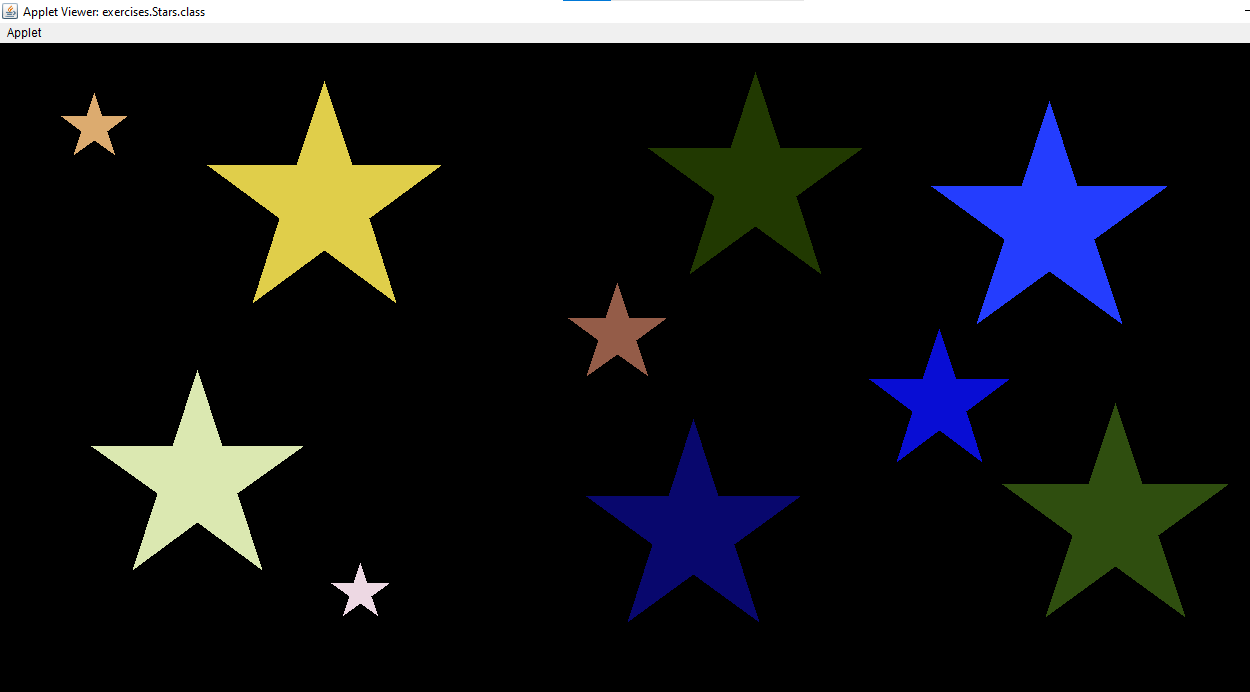
This was a challenging programming problem in which students created a java program to draw ten stars of random size in random locations on a canvas. In order to do this, all ten points on the star must be input into the fillPolygon method, so it was necessary to write expressions for the location of each of these points in terms of the coordinates of the center point in order to draw the stars in random locations. In addition to these requirements, I went above and beyond on this assignment by adding code to randomize the color of the stars and prevent them from overlapping without causing a reduction in the average star size. You can see my code here.
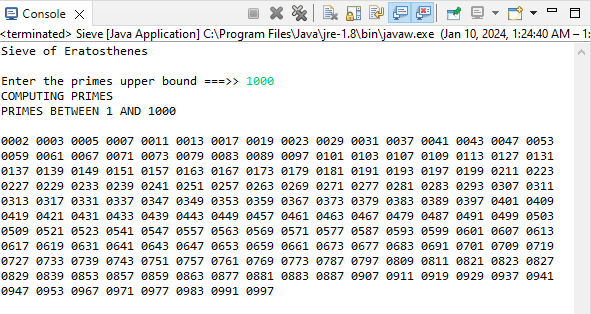
This assignment was a lab in which students programmed the Sieve of Eratosthenes, an algorithm for finding all prime numbers in a range by eliminating each number which is a multiple of a number less than or equal to the square root of the maximum. The program takes a maximum value as input, and works with values into the millions. See my code here.
The systems currently in place for food pickup and tracking of client preferences at the Loaves and Fishes food pantry in Worcester are inefficient, but can be improved through the use of our web application.
The pantry has distribution days once each month, during which clients must come between 9:00 and 11:30 AM to pick up food. Clients are served on a first-come-first-serve basis, which causes many clients to wait in the parking lot for as long as 45 minutes before the food pantry opens to ensure that they can get all the items they want before some items start to run out. Even clients who come later usually have to wait for about 30 minutes before being served.
Another issue with the current system is that clients' food preferences are tracked on a slip of paper. When a client comes to the food pantry for the first time, they are given a slip of paper with fields for their name and the size of their household, followed by a list of foods that are regularly carried at the pantry, and asked to cross off any foods they don't want. Each time a client comes to the food pantry, the volunteers must search through stacks of these slips to find the client's slip so a bag can be made according to their preferences. The process of searching through this stack is time-consuming for volunteers and hinders the pantry's ability to serve clients in a timely manner, especially when the lack of standardization in name order (First Last vs. Last, First vs Last First) causes slips to be sorted incorrectly and when slips are occasionally lost. The whole process can also be confusing to clients who don't understand all the words in English or don't understand that they're supposed to mark which items they don't want.
The target audience of our application consists of the clients of the Loaves and Fishes food pantry in Worcester, and, to a lesser extent, the volunteers and administrators of the pantry. It aims to save clients time by allowing frequent visitors to skip the line, and to make the line faster by eliminating the time consuming process of searching for clients' preference slips. Eliminating the need to constantly look through preference slips, and to sort the slips back into alphabetical order after each distribution day, will also make the volunteers' jobs more convenient for them.
Our app solves the aforementioned problems in the operation of the pantry by allowing clients to sign up for food pickup times and submit their preferences through the app.
The signup system would be available to frequent visitors of the pantry, and would allow them to select a 10-minute time slot between 9:00 and 11:30 to pick up their food at the upcoming distribution. The night before the distribution when volunteers meet to set up the pantry, the volunteers could create personalized bags for each client who had signed up for a slot and organize these bags separately from the generic bags in chronological order of when these clients were scheduled to arrive. Then, when one of these clients arrived during the proper time window on distribution day, their order would be brought out to them and they would be free to leave. This system saves clients significant amounts of time and makes it easier for volunteers to serve these clients on hectic distribution days. However, due to the nature of the system, signup must be limited to clients who the pantry is confident will show up. Otherwise, the pantry risks wasting time preparing bags for clients who don't show up during distribution, then running out of food on the shelves and having to search through these bags to find necessary items.
The new preferences system would provide a page for clients to fill out a digital version of the preferences slip. The digital form will be less confusing for clients because each food item will have a picture and users will simply have to toggle a checkbox for each food item rather than having to interpret the directions on the slip and make their own marks for volunteers to interpret later. Having the preferences data stored in a database rather than slips of paper allows volunteers to use the "find in page" feature of their browser to find the correct client rather than having to sort through papers, which takes significantly less time.
The minimum viable product for our app includes the ability to log in to either a client or admin account, a page for clients to sign up for a slot, a page for clients to enter their preferences, a page for admin to add new clients to the system, and a page for admin to view a list of clients with the time they're signed up for and their preferences. A cookie tracking the user's role prevents users from creating new client accounts without being logged into an admin account, and changes the links the user sees in the navigation bar based on their role. Finally, a logout button in the upper-right corner of the website allows users to log out when they finish using the app.
In addition to the features included in the minimum viable product, many additional features will be added to the application to improve its functionality. On the admin side, these features will include the ability to sort clients by chronological order of when they are scheduled to arrive, a search bar to find specific clients more easily, and the ability to manually edit or delete clients. On the client side, new features will include checking how many clients are signed up for each time slot and preventing additional clients from signing up once a certain number have chosen that slot already, as well as automatically updating the date of the next distribution day and resetting all client times to null after each one. Additionally, a new volunteer role will be added that can also view clients but can't add or modify them. Volunteers can also sign up for what times they will volunteer at the next distribution day, and admins will be able to view a schedule of which volunteers will be present at which times for the coming setup and distribution day. Finally, more styling will be added to make the app look more professional.
Initial research was performed to determine whether our application would be redundant with any preexisting applications. Through this process, it was concluded that several applications are already available to assist Food Pantries and their clients, but none of them are ideally suited to Loaves and Fishes and its clients.
For example, Plentiful is a reservation app to manage reservations at food pantries so that pantries can reduce wait times. However, the app lacks other functionality that would benefit Loaves and Fishes, such as managing client food preferences.
Another potential competitor is Food Pantry Helper, a web app that stores data about clients, inventory, donors, and volunteer schedules and provides analytics about the impact of the pantry. Similarly to Plentiful, Food Pantry Helper provides useful features to Loaves and Fishes, but lacks a client portal where clients can sign up for times and input food preferences. Furthermore, Food Pantry Helper does not provide sufficient space in its database for the data that Loaves and Fishes needs to store; the application only allows the pantry to store 4 custom data about each client, whereas more data will be necessary to store their food preferences, and only allows the pantry to preschedule food pickups if it subscribes to the $499-per-year premium plan.
Another similar app is EZ Pantry, which tracks clients and inventory to streamline the process of checking out food. EZ Pantry, however, hinges on products having scannable barcodes, which is not true of many items at Loaves and Fishes. Furthermore, EZ Pantry is designed for pantries with a much greater variety and quantity of products and allows the user a high degree of agency over the specific items they receive, but Loaves and Fishes has a limited stock of products and cannot allow clients such a high degree of choice without quickly running out of certain items. If most clients, for example, would prefer black beans over garbanzo beans, but none of the clients dislike either, EZ Pantry would give the first people to sign up only black beans and then everyone else garbanzo beans. The system preferred by Loaves and Fishes, on the other hand, would give everyone half garbanzo beans and half black beans, so that nobody is entirely disappointed.
As demonstrated by these competitors, many applications provide one or more of the features required by Loaves and Fishes, but none implement all of the necessary features in a way that best suits the pantry’s needs. Therefore, it was necessary to create a new application to meet the needs of the pantry.
Once it had been determined that a new application was necessary for the pantry, I and my teammates met with several executives at Loaves and Fishes to present our idea and discuss how it would be implemented. The executives expressed support for the idea and told us that the signup feature could only be implemented for trusted clients, as the pantry had previously tried making personalized bags ahead of time and had experienced the aforementioned issue of many clients not showing up.
After getting feedback on our ideas from the pantry, we began thinking of how the app could be implemented. We decided to use react.js, a JavaScript library for making interactive web applications. Making the app a web application would allow anyone to access it from any type of device, which is necessary because some clients of the pantry may not have mobile devices or any devices at all, requiring them to use the computers at their local public library. By using a web app, we could ensure that even those who do not own devices would be able to access it. Additionally, even for those who would view the application on mobile devices, it didn't make sense to install a native application that would be used only once or twice per month. By using react in particular, it was easier to create a dynamic application which changes the navbar links and the list of clients as necessary compared to writing the app in HTML and creating separate JavaScript programs for document object management and form submission.
We also decided on what pages would be required for each user role in the MVP, with a signup page and preferences form page for clients and a dashboard for admins to view client data. We were originally going to have a page for new clients to create accounts, but later realized it would be more logical for admins to create client accounts manually since client accounts must be restricted to current food pantry clients.
We began by coding the frontend for all our pages, but we struggled to integrate a database into our existin frontend code. Over the course of the project, we switched from Google Firebase to MongoDB to Microsoft SQL Express, and had little success with any of them. Finally, in the last week of the project, we started almost from scratch and integrated the frontend and backend from the beginning. We ended up using MERN stack, which uses MongoDB as the database, Express.js for the backend, React.js for the frontend, and Node.js as the JavaScript web runtime. If you're interested in learning MERN stack to create a similar app, I highly recommend this YouTube tutorial.
Midway through the project, we created a spreadsheet listing all functionality we wanted our application to have by the end of the project. At the end of the project, we went through each case in the spreadsheet one by one and listed "pass" or "fail" for each one. Overall, our MVP was judged successful in testing, with almost all of the failed test cases being related to the lack of a volunteer role since we had expected to have a volunteer role added by the end of the project.
The source code for our app can be viewed here, and our poster from the Apps for Good fair can be viewed here.